GrepTag reads the full text of your EPUB and TXT files, finds every book that mentions what you're looking for, and turns saved searches into tags. Scanning happens on your device.
Free download on the App Store with optional Pro. Paid app on the Microsoft Store.
Full text, not file namesMatches words inside the book body as well as the file name
Your whole library in one passOne search scans every imported EPUB and TXT book
Rules you can re-runSave AND, OR and NOT keywords as reusable profiles
Private by designNo developer server, no account, no analytics in the app
Try it
See how a profile decides which books get a tag
Type keywords or pick a preset. The playground applies GrepTag's matching rules to a small shelf of public-domain books: case and accents are ignored, ? stands for one character and * for up to ten, and profile rules run left to right.
Illustrative demo running in your browser on short public-domain excerpts. The app scans the complete text of your own files; nothing you type here is sent anywhere.
How it works
From a pile of files to a library you can question
Content search
Find the book, not just the file name
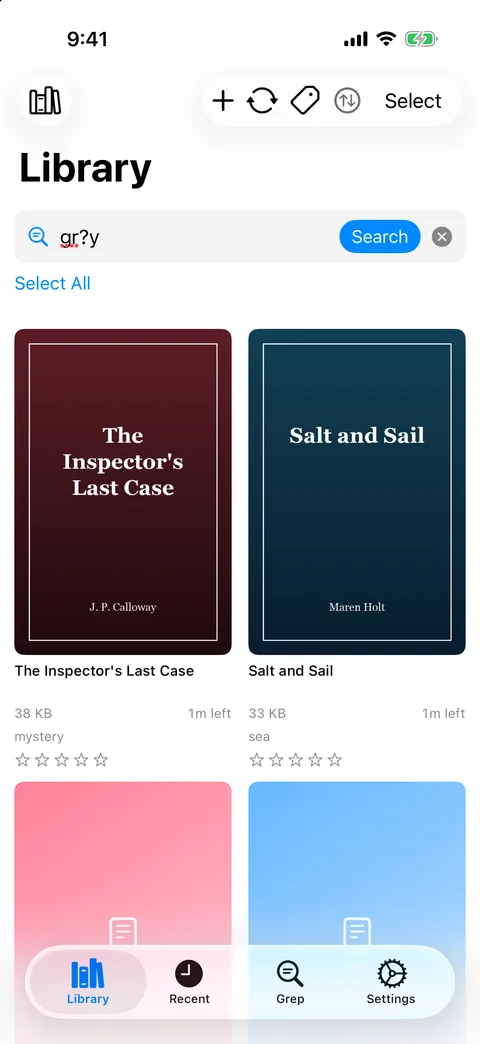
Switch the Library search to Content (inside files), type one or more keywords separated by commas, and GrepTag lists every EPUB and TXT book whose text contains any of them. Matching ignores case and accents, so cafe also finds “café”.
Checks the book text and the file name
Searches your whole imported library in one pass
Reads Chinese, Japanese and Korean TXT files in legacy encodings such as GB18030, Big5 and Shift-JIS
Results are a list of matching books. Open a book to see each match in context.
Grep profiles
Save the question. Re-ask it whenever your library grows.
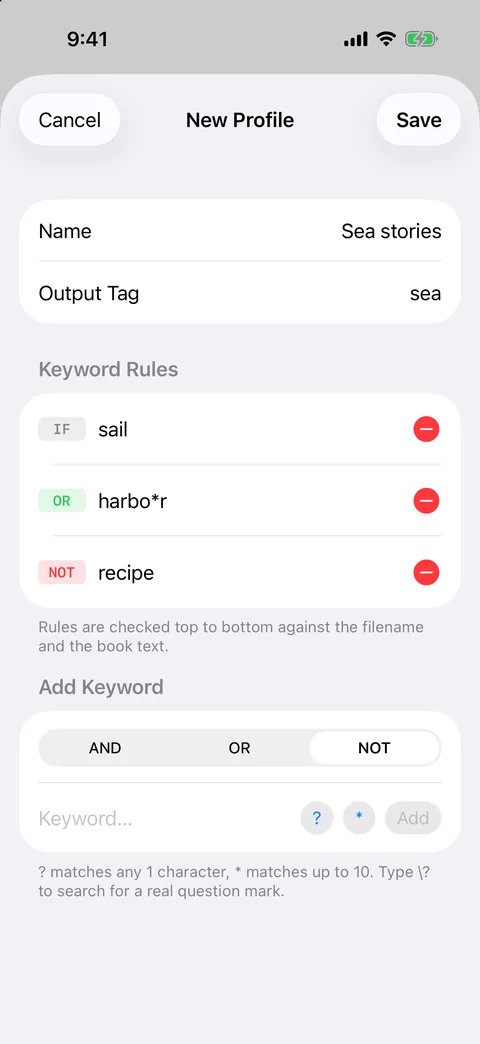
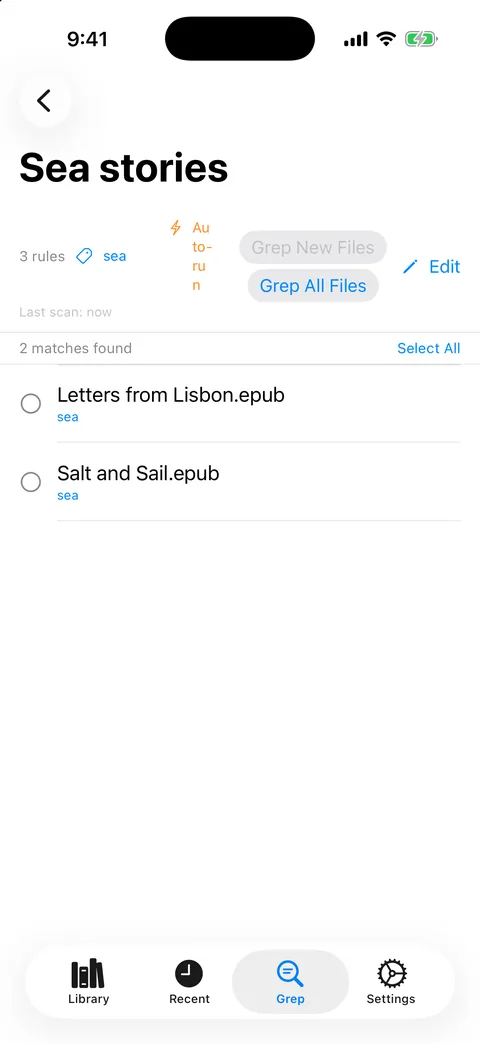
A profile is a list of keyword rules joined by AND, OR and NOT, plus the tag it applies. Rules are evaluated left to right, exactly as written, so ship OR whale AND harpoon means “(ship or whale) and harpoon”.
Grep New scans only books a profile hasn't checked yet
Grep All re-runs every profile across the library
Wildcards: gr?y finds grey and gray, colo*r finds color and colour
Free: 2 profiles. Pro: unlimited.
Tags
Turn matches into tags you can filter by
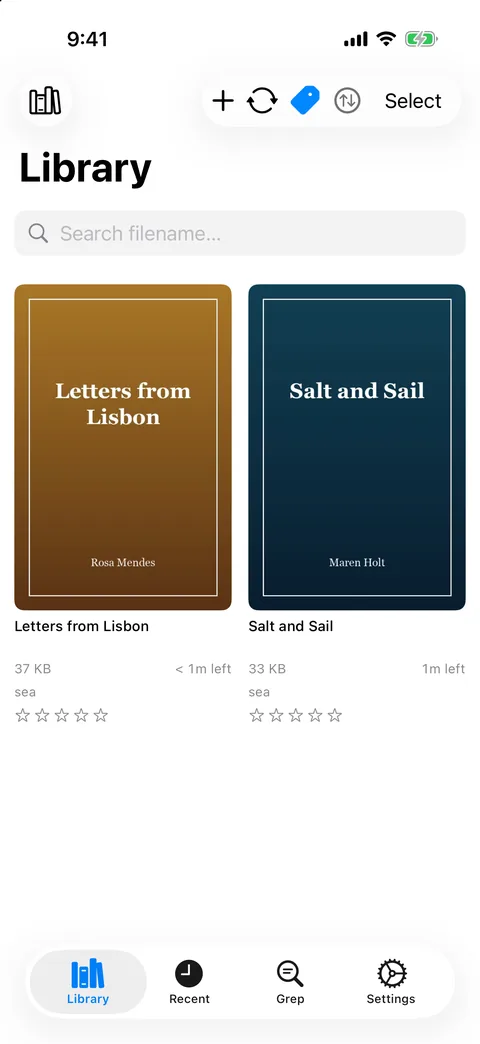
Apply a profile's tag to every matching book with Tag All, or pick books by hand. Then filter the Library by one or more tags to see only the books that carry all of them.
Tags, ratings and profiles go into a backup file you can export and import
Sort by title, rating or date and narrow by format
Free: up to 5 different tags. Pro: unlimited.
Auto-tag on import · Pro
New books arrive already sorted
Turn on Auto-run for a profile and GrepTag checks every newly imported book against it, tagging the matches without you lifting a finger.
Auto-run on import is part of GrepTag Pro on iPhone, iPad and Mac.
Details that matter
Built for libraries of real, messy files
Free
Wildcards that respect lines
? matches one character (one letter, one CJK character) and * up to ten. Neither crosses a line break, so a match never glues two paragraphs together.
Free
Old encodings, decoded
UTF-8, UTF-16, GB18030, Big5, Shift-JIS, EUC-JP, EUC-KR and Western encodings are detected automatically.
Pro
Covers for plain text
Match a TXT book to a same-named image in its folder, or paste an image URL.
Pro
Wi-Fi and iCloud sync
Keep books, tags, ratings and profiles in step between your devices over the local network or your own iCloud Drive.
Free / Pro
Backups you control
Export and import a backup file of tags, ratings and profiles for free. Pro adds an automatic daily iCloud backup.
Free
Check the match in place
Open any result to find the keyword inside the book, with a snippet for each hit.
Pro
Folders that keep their tags
Move books into folders without losing their tags or reading position.
Get started
Three steps to a searchable library
1
Import your books
Add EPUB and TXT files from Files, iCloud Drive or a folder on your Mac. They stay where you keep them.
2
Ask a question
Search the text in the Library, or save the question as a profile with AND, OR and NOT rules.
3
Tag and filter
Apply the profile's tag to every match, then filter by tags whenever you need that shelf again.
Platforms
Where GrepTag runs
One App Store purchase covers iPhone, iPad and Mac. The Windows app is a separate Microsoft Store product.
iPhone & iPad
Mac
Windows
Content search in the Library
✓Yes
✓Yes
—Searches file names and tags
AND / OR / NOT profiles
✓Yes
✓Yes
✓Yes
Wildcards ? and *
✓Yes
✓Yes
—No
Auto-run profiles on new books
✓Pro
✓Pro
✓Included
Wi-Fi sync between devices
✓Pro
✓Pro
✓Included
Backup file of tags and profiles
✓Yes
✓Yes
◐Tag database export and import
Requires
iOS / iPadOS 17 or later
macOS 14 or later
Windows 10 (2004) or later
Price
Free download, optional Pro
Same purchase as iPhone and iPad
Paid app, everything included
Feature availability checked against the app source on 21 November 2026. The Windows Store listing is currently in English only; the Windows app itself offers the same 12 languages.
Questions
Short answers
Which file formats can GrepTag search?
EPUB and plain-text TXT files. PDF, comic archives (CBZ/CBR), MOBI/AZW and Word documents aren't supported.
Is it a regular expression (regex) search?
No. GrepTag matches plain text, ignoring case and accents, plus two wildcards: ? for one character and * for up to ten. A search for cat also finds “category”, so choose distinctive keywords.
Are my books uploaded anywhere?
No. Scanning runs on your device and there is no GrepTag server or cloud index. The network is only used for features you choose, such as Wi-Fi or iCloud sync and App Store purchases.
What does GrepTag Pro add?
Unlimited profiles and tags, auto-tagging of new books, TXT covers, folders, Wi-Fi and iCloud sync, and an automatic daily iCloud backup. Searching and scanning are unlimited in the free version.