
What a profile is
A profile has three parts: a name, a list of keyword rules and an output tag. When you run it, GrepTag checks every book's text and file name against the rules. Books that match receive the output tag.
How rules are evaluated
The first rule sets the starting result: does the book contain this keyword? Each following rule then combines with the result so far:
- AND: the book must also contain this keyword.
- OR: the book may contain this keyword instead.
- NOT: the book must not contain this keyword.
Rules are applied strictly from left to right, with no precedence and no brackets. So ship OR whale AND harpoon means “(ship or whale) and harpoon”. To express “ship, or both whale and harpoon”, reorder the rules: whale AND harpoon OR ship.
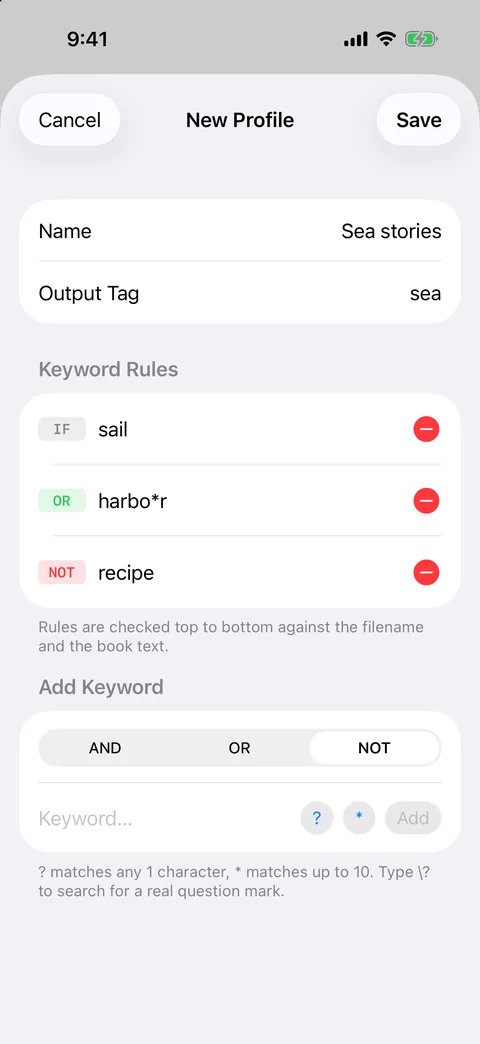
A profile combines keyword rules and applies one tag to every match.
Example profiles
| Goal | Rules (left to right) | Tag |
|---|---|---|
| Crime and mystery | detective OR inspector OR murder | mystery |
| Sea stories, without cookbooks | sail OR harbour OR harbor NOT recipe | sea |
| Grey or gray, in one rule | gr?y AND wolf | grey-wolf |
| Books set in Kyoto | 京都 OR Kyoto | kyoto |
| Study list | photosynthesis AND chlorophyll | biology |
Running profiles
- Grep New checks only the books a profile hasn't scanned yet. It's the quick option after an import.
- Grep All re-runs every profile across the whole library. Use it after you change a profile's rules.
- Review the matches, then choose Tag All or select specific books and apply the tag.
Tag new books automatically (Pro)
With GrepTag Pro, switch on Auto-run for a profile. When you import books, GrepTag scans just the new arrivals against your auto-run profiles and applies their tags. Your library sorts itself as it grows.
Free-version limits
The free version includes unlimited scans, 2 profiles and up to 5 different tags, which is enough to try the workflow on a real library. Pro removes those limits and adds auto-run, sync and an automatic daily iCloud backup.
Keep your tags safe
Export a backup file of tags, ratings and profiles from Settings at any time, and import it on another device. Restoring matches books by file name and size.